

A print formatting guide
How to Format a Puzzle Book for Amazon KDP
A puzzle book is used, not just read. Readers write in it, study maps and grids, and flip to the answers — so text that runs into the binding, a grid that is too small to write in, or a solution on the wrong page spoils it in a way a novel would survive. This guide walks through formatting a paperback interior for Amazon KDP: trim size, bleed, margins, page count, the PDF, the cover file and the final checks, with a worked example.
KDP sets the rules. The KDP figures here are the ones KDP Help listed when this guide was checked (16 October 2026); they change from time to time, so check the official pages before you upload. KDP decides what it accepts — no tool or guide can promise approval.
1. Choose the trim size
The trim size is the finished page size, after the printer cuts the paper. Choose it first: margins, type size, how much of a map fits on a page and, in the end, the page count all follow from it. KDP offers a range of paperback trims, from small pocket sizes up to 8.5 × 11 in; not every trim is available with every ink and paper choice, so check KDP Help: Set Trim Size, Bleed, and Margins for the current list.
For a puzzle book, the trade-offs are practical:
- Larger trims (7 × 10 in, 8 × 10 in, 8.5 × 11 in) give maps, grids and clue lists room, and leave space to write. They suit puzzles that are solved on the page.
- 6 × 9 in is a familiar paperback size and easy to carry, with less room per page — fine for compact puzzles, tight for large maps.
- Small trims force small text and cramped grids. Test a real page printed at actual size before you commit: if the clues are hard to read or the grid is hard to write in, the trim is too small for that puzzle.
In Cluevora
Cluevora exports interiors at these sizes: US Letter — 8.5 × 11 in, A4 — 210 × 297 mm, 6 × 9 in, 6.14 × 9.21 in, 6.69 × 9.61 in, 7 × 10 in, 7.44 × 9.69 in, 7.5 × 9.25 in, 8 × 10 in.
Smaller trims (5 × 8 in, 5.06 × 7.81 in, 5.25 × 8 in, 5.5 × 8.5 in, A5 — 148 × 210 mm) can be previewed but not exported: Cluevora keeps printed clue text at 9 pt or more, and its case pages do not fit those sizes at that type size.
2. Understand bleed and no bleed
Bleed means something is printed right to the edge of the page — a background colour, a full-page photo. Because the cut is never perfectly exact, a page with bleed is set up larger than the trim and the artwork is extended past the cut line, so no thin white edge appears. No bleed means nothing reaches the edge: every page is set up at exactly the trim size and everything printed stays inside the margins.
KDP Help gives the numbers: with bleed, each page is 0.125 in larger on the outside, top and bottom edges — so the page is 0.125 in wider and 0.25 in taller than the trim (a 6 × 9 in trim becomes 6.125 in × 9.25 in). If even one page in the interior bleeds, the whole file has to be set up with bleed, and a bleed interior must be uploaded as a PDF. Bleed also raises the outside, top and bottom minimum margin from 0.25 in to 0.375 in (KDP Help: Set Trim Size, Bleed, and Margins).
Most puzzle interiors do not need bleed: white pages with text, grids and maps inside the margins print cleanly without it. Choose bleed only if a design genuinely runs to the edge.
In Cluevora
Every Cluevora interior is exported with no bleed: the PDF page is the trim, and nothing is printed past the margins. There is no bleed setting to get wrong.
3. Set the margins
Margins keep content away from the cut edges and out of the binding. A paperback has two kinds:
- The inside margin (gutter) is on the spine side. It must grow with the page count, because a thicker book curves more into the spine.
- The outside, top and bottom margins are at least 0.25 in without bleed (0.375 in with bleed), whatever the page count.
KDP’s minimum inside margin, by page count (KDP Help: Set Trim Size, Bleed, and Margins):
| Pages | Minimum inside margin |
|---|---|
| 24–150 | 0.375 in |
| 151–300 | 0.5 in |
| 301–500 | 0.625 in |
| 501–700 | 0.75 in |
| 701–828 | 0.875 in |
On facing pages the inside margin swaps sides: on a right-hand (odd) page it is on the left; on a left-hand (even) page it is on the right. In a word processor this is “mirror margins”. These are minimums: leaving a little more is safe; leaving less is a problem the Print Previewer will flag.
In Cluevora
Margins are not a setting. Cluevora reads the finished book’s page count, applies the inside margin from the table above on the spine side of each page, and keeps at least 0.25 in on the other three edges.
4. Arrange the puzzle pages
Inside the margins, a puzzle page has to work as a tool. A few rules hold for most puzzle books:
- Keep each puzzle on one page, or on one spread. A clue list that continues overleaf makes the reader flip back and forth.
- Size text for print, not the screen. Clues, labels and grid letters should be comfortable at arm’s length; print a test page at actual size.
- Leave room to write. Grids and maps need cells large enough for a pencil mark, and a worksheet page earns its place for longer puzzles.
- Keep thin lines printable. Hairline grid rules and pale greys can disappear in print; check them in a proof copy.
- Keep the answer off the puzzle page. Nothing on the page should give the solution away — not a highlighted name, not the order of a list.
In Cluevora
Each case is 3 pages — the Puzzle page, an Investigation worksheet and the Solution — laid out to fit the trim, with clue text kept at 9 pt or more. Before exporting, the Studio checks every page and stops the export if a page no longer fits, so you can fix it first. A real case, as exported:
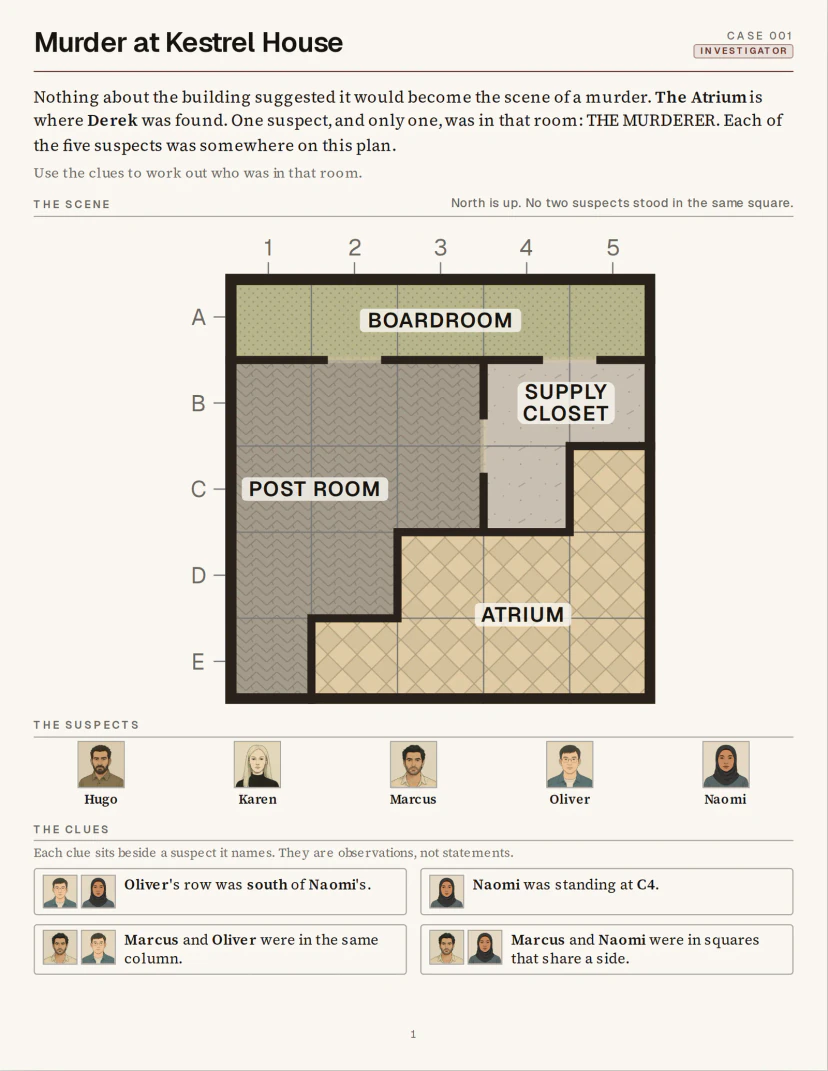
Puzzle page 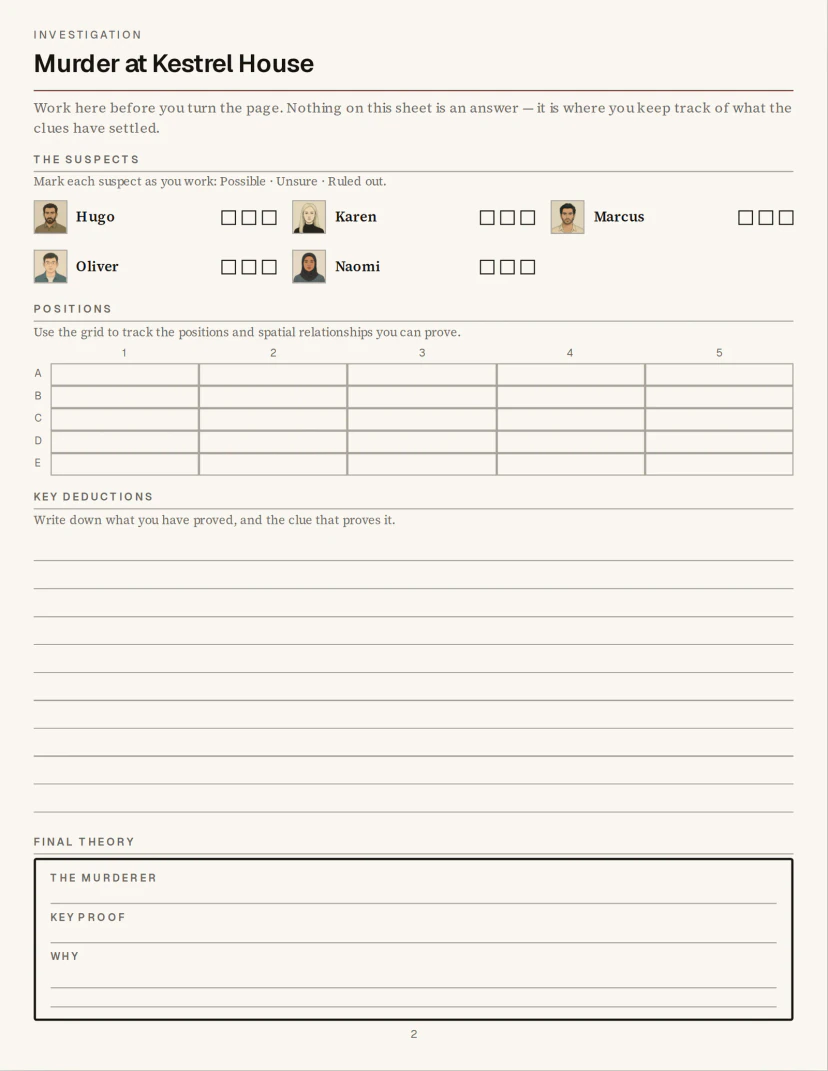
Investigation page 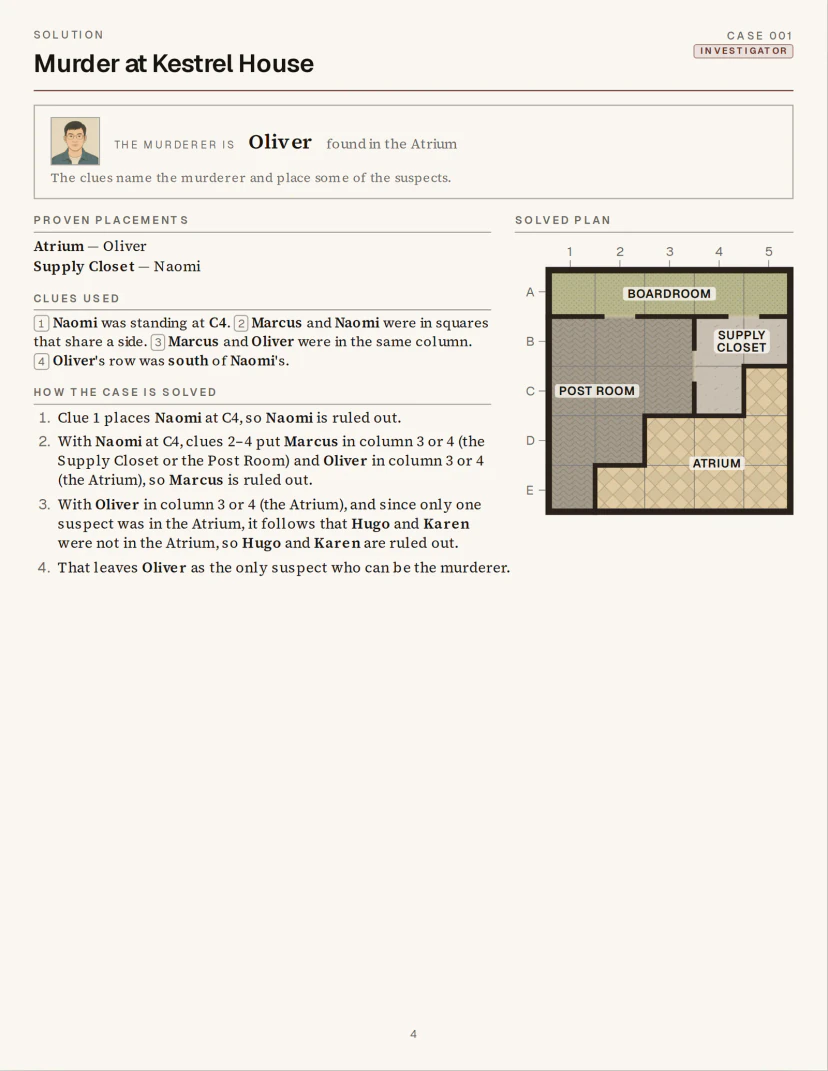
Solution page


5. Organize the solutions
Where the answers go changes how the book is used. There are two common layouts:
- A solutions section at the back, after all the puzzles. Turning the page never spoils the next puzzle; a divider page marks where the answers start.
- Each solution straight after its puzzle. Convenient for books solved one sitting at a time, but a glance at the next page gives the answer away.
Either way, make answers easy to find: number every puzzle, label each solution with the same number, and print page numbers. For a long book, a table of contents helps readers jump between sections.
In Cluevora
A new book puts its solutions at the back, behind a Solutions divider page; you can switch to after each case. Cases are numbered from Case 001, page numbers start on the first case, and front-matter pages — a copyright page, How to Solve, This Book Belongs To — can be added as pages of the book.
6. Understand page count
Page count matters three times over:
- It has limits. KDP’s paperback minimum is 24 pages. The maximum depends on ink, paper and trim — up to 828 pages for the most common combinations, fewer for others (KDP Help: Paperback Submission Guidelines).
- It sets the inside margin. Crossing a bracket in the table above — from 150 to 151 pages, say — means a wider inside margin, which narrows every page’s live area.
- It sets the spine width, and so the size of the cover file (step 8).
So fix the page count before you finalise the cover, and recheck the inside margin after any edit that adds or removes pages. Remember that front matter, divider pages and blank pages all count.
In Cluevora
The inside margin follows the book’s page count automatically, and the Studio will not export a book of more than 828 pages: it asks you to split it into separate books first.
Hypothetical example
A worked example: a 6 × 9 in book
This is a hypothetical book, for illustration. Picture a mystery puzzle book at 6 × 9 in, black ink, no bleed, with solutions at the back. Each case takes 3 pages (puzzle, worksheet, solution); there are 4 front-matter pages and 2 at the back (a solutions divider and an About the Author page). Two versions:
| 30 cases | 60 cases | |
|---|---|---|
| Page count | 4 + 30 × 3 + 2 = 96 | 4 + 60 × 3 + 2 = 186 |
| Inside margin (minimum) | 0.375 in | 0.5 in |
| Outside, top, bottom | 0.25 in | 0.25 in |
| Live area per page | 5.375 in × 8.5 in | 5.25 in × 8.5 in |
Margins
At 96 pages the book falls in the first bracket, so the inside margin is at least 0.375 in. Doubling the cases takes it to 186 pages, into the next bracket: the inside margin becomes 0.5 in and every page loses 0.125 in of width. A layout designed for the shorter book must be rechecked for the longer one.
No bleed
The PDF pages are exactly 6 × 9 in; nothing is printed within 0.25 in of the outside, top or bottom edge, or within the inside margin of the spine.
Readable elements
Each puzzle’s map and clues sit inside the 5.375 in × 8.5 in live area, on one page; page numbers and running heads also stay inside the margins.
Solutions
Puzzles 1–30 come first, then the divider, then the solutions in the same order, each labelled with its puzzle’s number.
Before upload
Check that the page count is final, the cover is sized for that page count and paper, and the PDF opens at 6 × 9 in on every page.
7. Prepare the interior PDF
KDP prints from the interior file you upload. For a puzzle book, a PDF is the safest choice. What KDP Help asks of it:
- Every page at the trim size (or trim plus bleed, if you use bleed), in reading order, one page per page.
- Images at least 300 DPI at the size they print. To check one: its pixel width divided by its printed width in inches.
- Fonts embedded in the PDF, so the printer uses the ones you chose.
- No printer’s marks or extras — no crop marks, comments or annotations.
See KDP Help: Paperback Submission Guidelines for the full list. If you print in black ink, check that any colour on your pages still reads in greyscale.
In Cluevora
The print file is one PDF of the whole book. Each page is a single 300 DPI image at the trim size, so there are no fonts to embed and nothing to downsample — the trade-off is that the text is not selectable or searchable, which does not matter for print but does for an ebook. The free Trial exports 1 watermarked PDF; paid access exports clean PDFs.
8. Prepare the cover separately
The cover is a separate file from the interior, uploaded separately. For a paperback it is one PDF holding the back cover, the spine and the front cover side by side, with bleed on every edge (0.125 in). Its width is:
bleed + back cover + spine + front cover + bleed
The back and front are each the trim width; the spine width depends on the page count and the paper. Because the spine depends on the page count, make the cover after the interior is final. KDP’s cover calculator and KDP Help: Create a Paperback Cover give the exact dimensions for your book, and say when a book is thick enough for spine text.
You can design the cover yourself, have a designer make it, or use KDP’s Cover Creator. Whatever you use, start from the dimensions for this book: a cover made for a different page count will not fit.
9. Check the book in the Print Previewer
When you upload the interior and cover, KDP checks them and shows the book in its Print Previewer. It flags problems it can detect — content outside the margins, pages at the wrong size, fonts that are not embedded — and KDP Help: Fix Paperback and Hardcover Formatting Issues explains each one. It cannot judge whether a puzzle works, so page through the whole book yourself:
- The trim size and page count shown are the ones you intended.
- Nothing is flagged outside the margins — and nothing important sits close to the spine.
- Every puzzle is complete on its page or spread; no clue list runs over.
- Text, grid lines and map labels are readable at actual size.
- Puzzles and solutions are in order, and every solution matches its puzzle number.
- Page numbers run in sequence and appear where you expect them.
- Divider, front-matter and blank pages fall where you intended.
- The cover’s spine and front line up with the interior you uploaded.
For a print run you care about, order a proof copy: some problems — line weights, writing space — only show on paper.
10. Common formatting mistakes
- Choosing the trim after the layout
- Everything depends on the trim. Choose it first, and reflow and recheck every page if you change it.
- Using one margin for every book
- The inside margin depends on page count. Recheck it whenever pages are added or removed.
- Setting up bleed you don’t need — or forgetting it when you do
- If nothing touches the edge, use no bleed. If one page does, the whole interior must be set up with bleed.
- Text and grids too small to use
- Print a page at actual size before committing. If you strain to read it or can’t write in the grid, enlarge it or choose a larger trim.
- Solutions that spoil the next puzzle
- Put solutions at the back behind a divider, or make sure no answer faces the next puzzle.
- Making the cover before the page count is final
- The spine width follows the page count. Build the cover last, from KDP’s dimensions for that exact book.
- Low-resolution images
- Images below 300 DPI at their printed size can print soft. Check pixel size against printed size.
- Trusting the screen
- Review every page in the Print Previewer, and order a proof copy for anything you plan to sell.
11. Using Cluevora
Everything above applies whatever you make your book with. If you make mystery puzzle books, Cluevora handles the interior side of it for you:
- Choose the trim size, then generate cases from structured settings — the case type, size, map style and difficulty.
- Add your front matter and choose where the solutions go; the book’s pages appear along the bottom of the Studio.
- Export: the Studio checks every page fits, applies the margins for the final page count, and writes the PDF.
- Make the cover for that page count, upload both files to KDP, and review them in the Print Previewer.

For the craft behind the cases, read how to design a mystery puzzle with exactly one solution; for planning a whole mystery book, see creating mystery puzzle books for Amazon KDP; and to see complete exported cases, browse real mystery puzzle book examples.
Official KDP references
The KDP figures in this guide come from these official KDP Help pages, last checked on 16 October 2026. KDP updates them; the live pages are the authority.
- Set Trim Size, Bleed, and Margins(opens in a new tab)
Trim sizes, bleed, inside and outside margins by page count.
- Paperback Submission Guidelines(opens in a new tab)
Page counts, file requirements, image resolution and the PDF.
- Create a Paperback Cover(opens in a new tab)
The cover file: one PDF of back, spine and front, with bleed and the spine width.
- Fix Paperback and Hardcover Formatting Issues(opens in a new tab)
What the Print Previewer flags and how to fix it.
Cluevora is not affiliated with, sponsored by or endorsed by Amazon. Nothing here guarantees that KDP accepts a book or that it sells.
See a formatted interior for yourself
The free Trial is the real Studio: generate up to 3 cases with 4 to 6 suspects and export 1 watermarked PDF to check the layout. Sign in with your email — no credit card.
Try Cluevora FreeTrial content is for evaluation only and is not licensed for commercial use. Commercial-use rights come with paid access — see the commercial-use summary.